Shopify order reconciliation for GA4 and Meta
Find the Shopify orders GA4 and Meta never received.
TagGap matches every Shopify order with what your analytics and ad platforms reported, then names the purchases that went missing, were counted twice or were sent with the wrong value. Each one comes with the evidence and a fix.
- Read-only
- No customer data
- No pixel to install
- Free plan
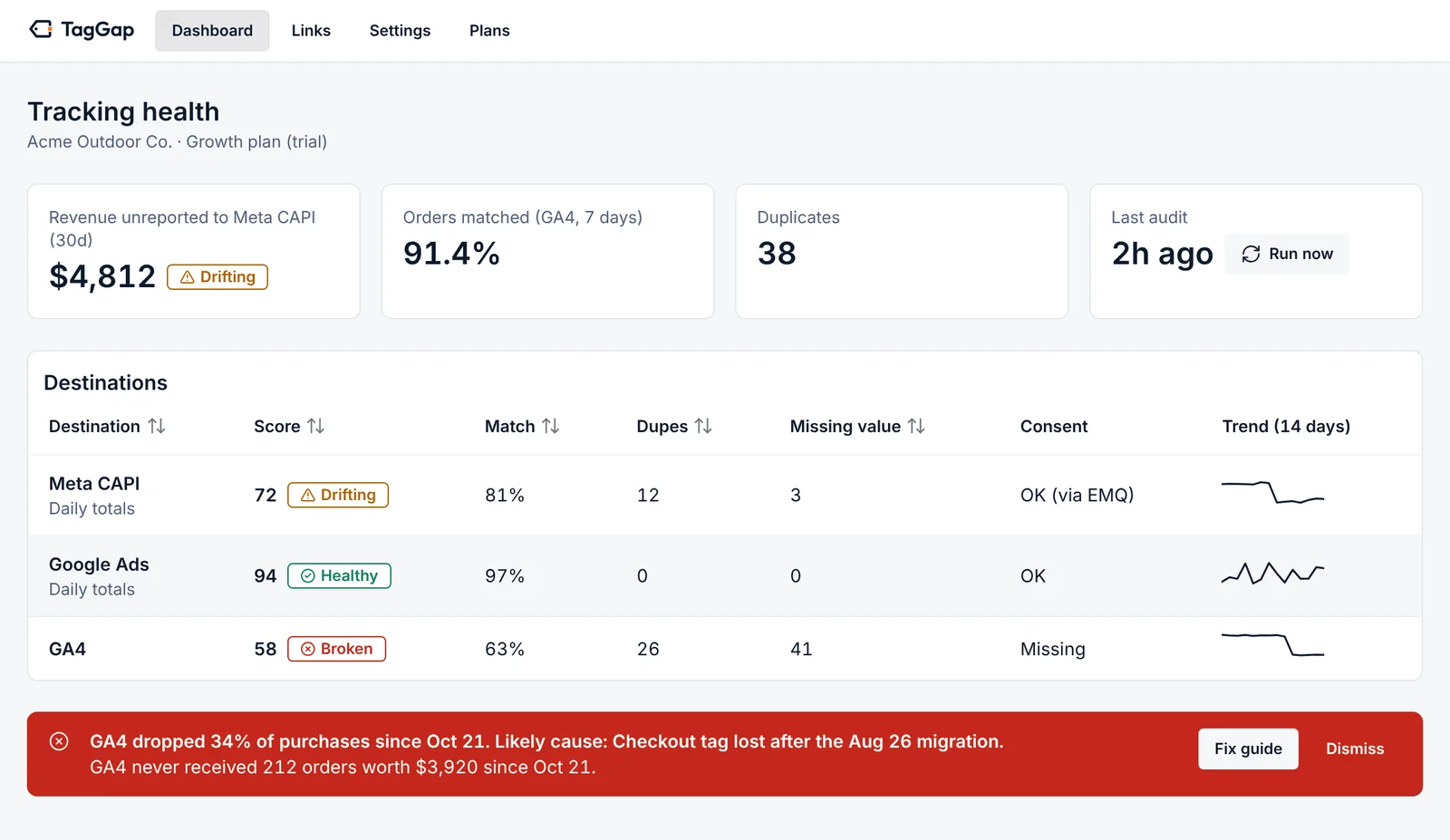
Your dashboards disagree. Nobody can tell you which orders.
Shopify says 1,240 orders. GA4 says 1,050.
Some of that gap is normal: consent, ad blockers, POS sales. Some of it is a tag that stopped firing. In a dashboard they look identical.
Purchase tracking moved into checkout
Since Shopify's August 26, 2026 cut-off for legacy Thank you page scripts, purchases fire from app pixels inside checkout, where no outside scan or browser extension can see them.
Bad data trains your ads
Missing purchases make campaigns look worse than they are, and duplicates make them look better. Smart bidding optimizes toward whichever is wrong.
Order counts above are an illustration.
Free · no install · about 20 seconds
Is your Shopify tracking broken? Scan your storefront
Paste your store address to see which pixels and tags load, which load twice, and whether consent is defaulted correctly.
-
Pixels and tags
Meta Pixel, GA4, Google Ads, TikTok and GTM containers with their IDs, plus server-side setups such as Elevar or Stape.
-
Double counting
Tags loaded twice, purchase events without an event_id, and theme snippets that duplicate an app's pixel.
-
Consent defaults
Whether Consent Mode defaults to denied before your banner loads, as Google and EU law expect.
Also free: check an ad link
See whether fbclid, gclid and UTMs survive every redirect between your ad and your page.
How TagGap works
-
Connect, read-only
Install from Shopify, then connect GA4 and Meta with read-only permissions. Nothing in your tracking changes.
-
Every order is matched
GA4 purchases are matched to orders by transaction_id. Meta is compared day by day. Test, POS, draft and rebill orders are set aside.
-
You get named orders and a fix
See which orders are missing, duplicated or mis-valued, the likely cause, and a step-by-step guide. Get an alert when it changes.
What the app shows you
GA4 · order by order
Every unmatched order, with proof
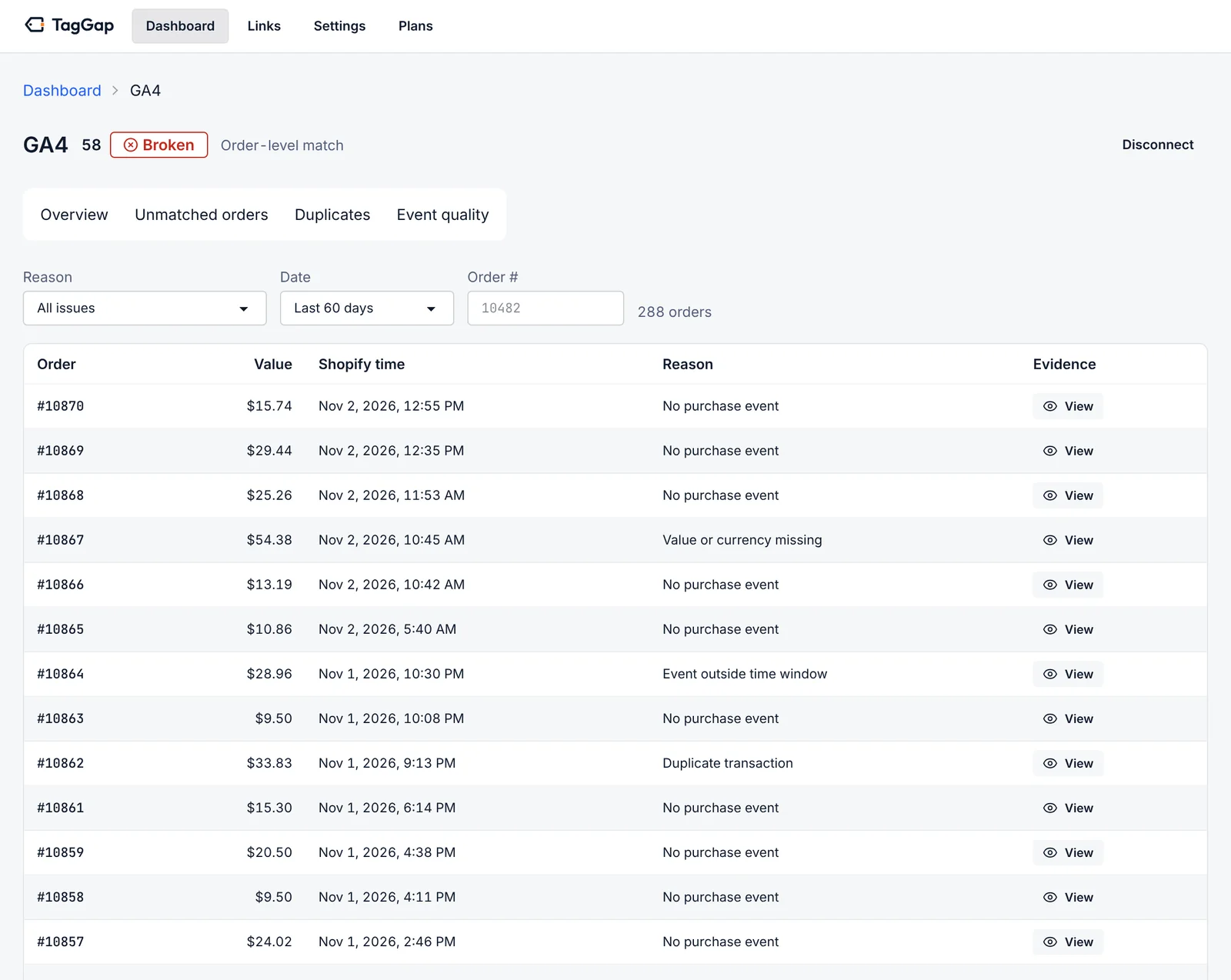
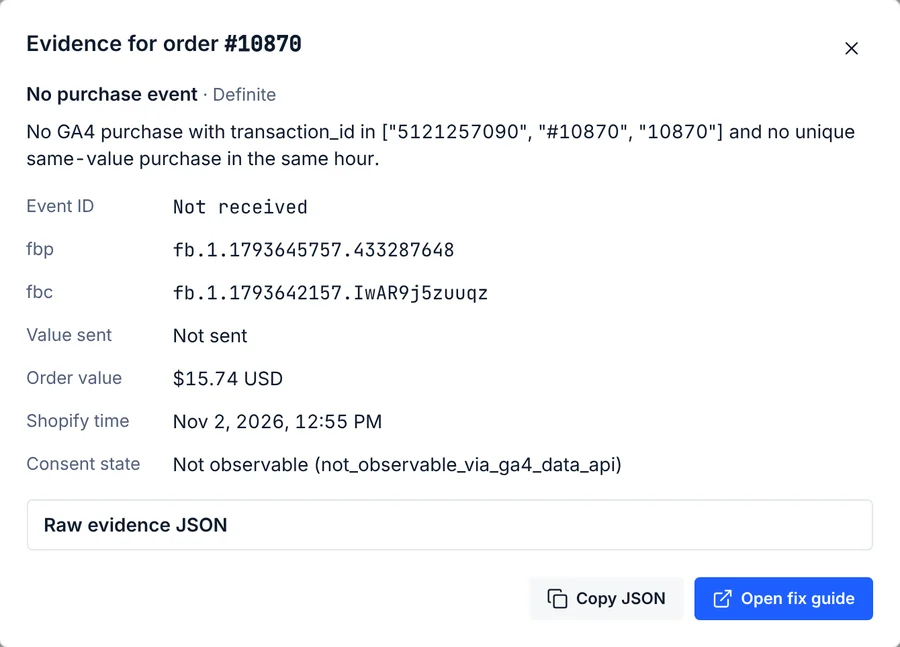
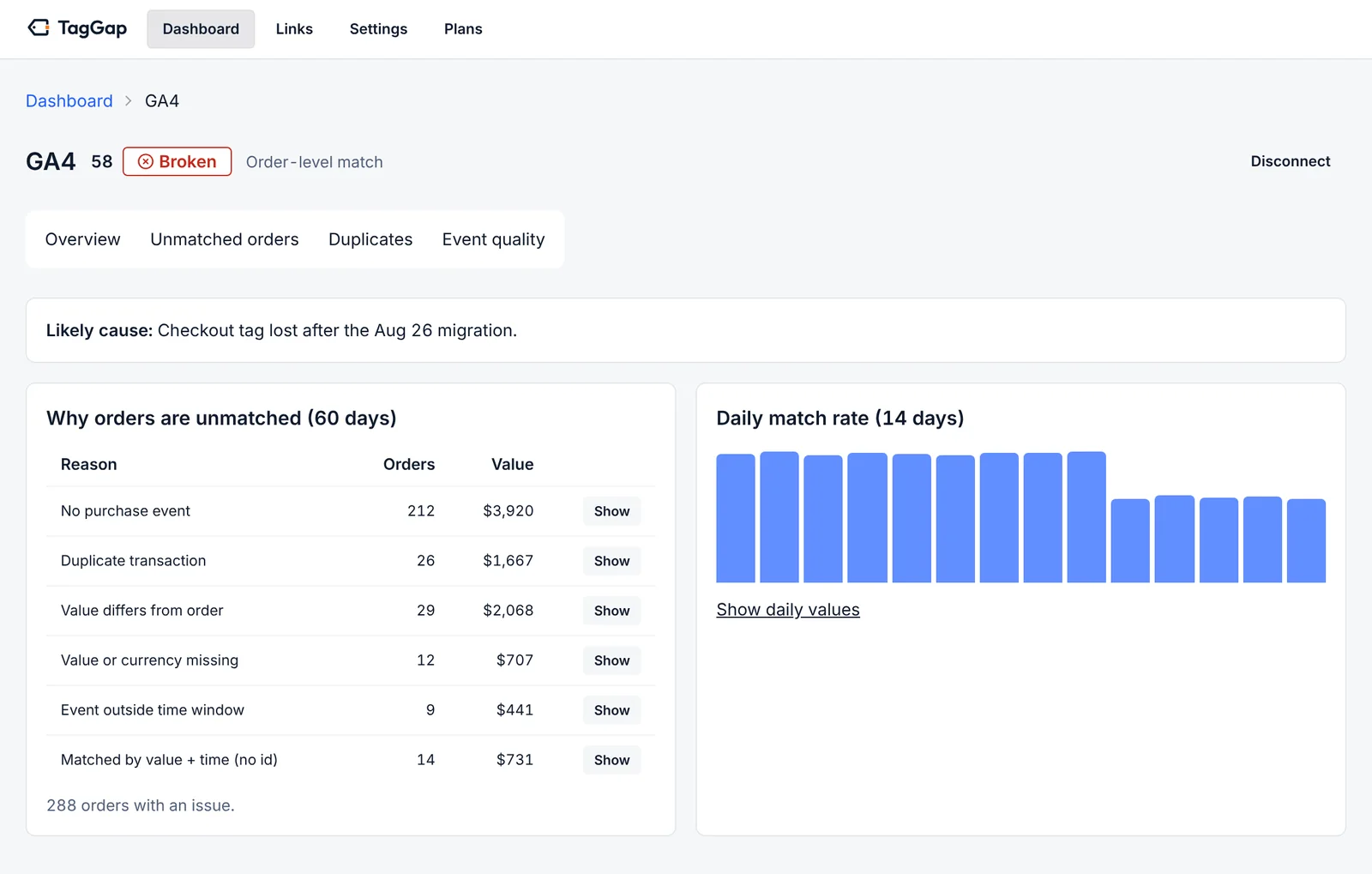
TagGap lists each Shopify order with no GA4 purchase, a duplicate, a wrong value or a late event. Open any order to see the ids it searched for, what was sent, and the fix guide for that exact problem.
- transaction_id matched against order id, number and name
- Same-value, same-hour fallback, clearly labeled
- Copy the raw evidence as JSON for your developer
Meta · day by day
Meta gaps, without the guesswork
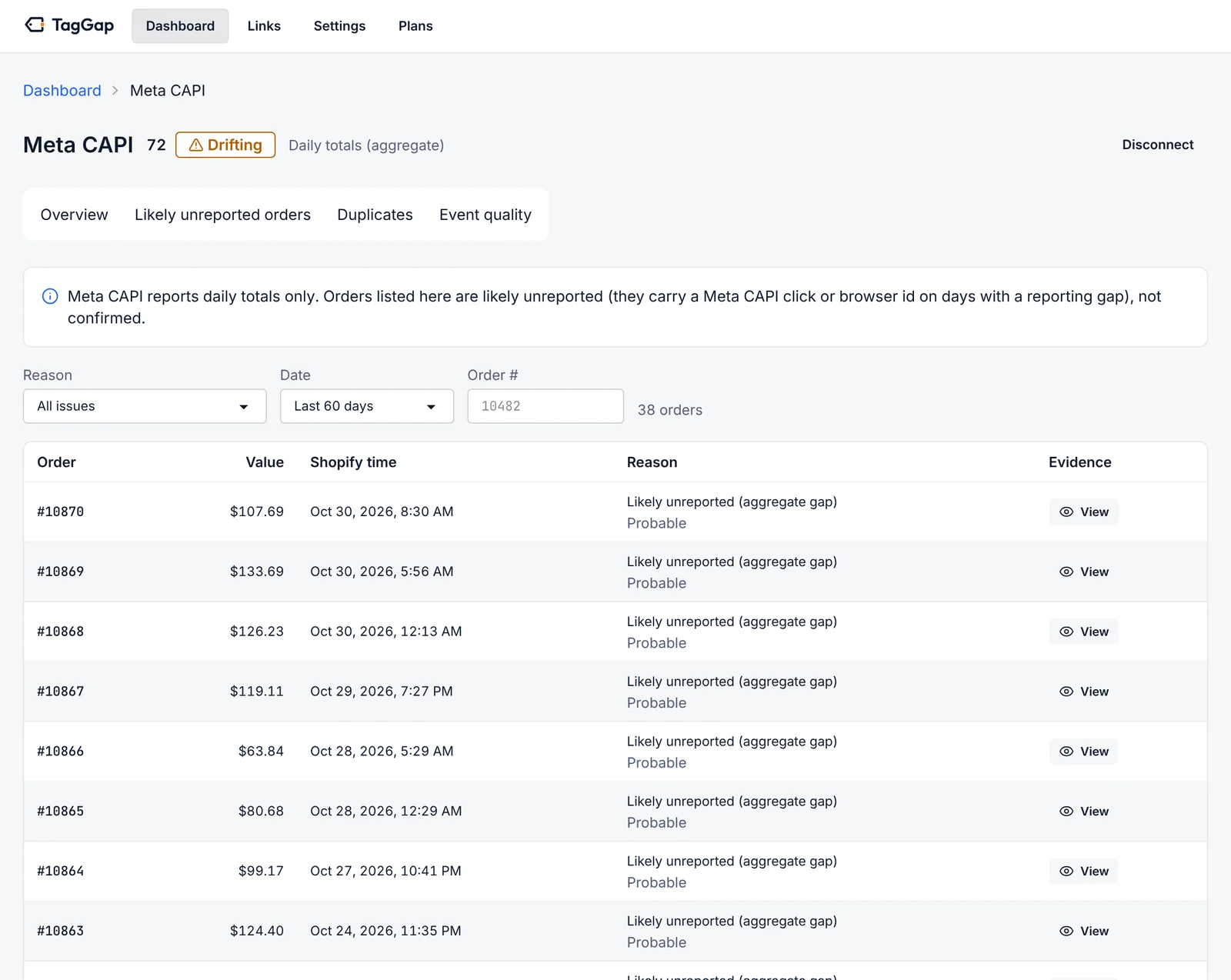
Meta only reports daily totals, so TagGap compares each day with your Shopify orders and lists the orders that carried a Meta click or browser id on days with a gap. They are marked probable, not confirmed, because that is what the data supports.
- Revenue unreported to Meta, in dollars
- fbp and fbc shown per order
- Browser and server deduplication checks
Diagnostics
The reason, not just a red number
Unmatched orders are grouped by cause with their count and value, so you fix the problem that costs the most first. A drop in the daily match rate is flagged the day it happens.
- No purchase event, duplicate, value mismatch, missing currency, late event
- Likely cause, for example a checkout tag lost in a migration
- Email and Slack alerts
Ad links
Catch ad links that drop click ids
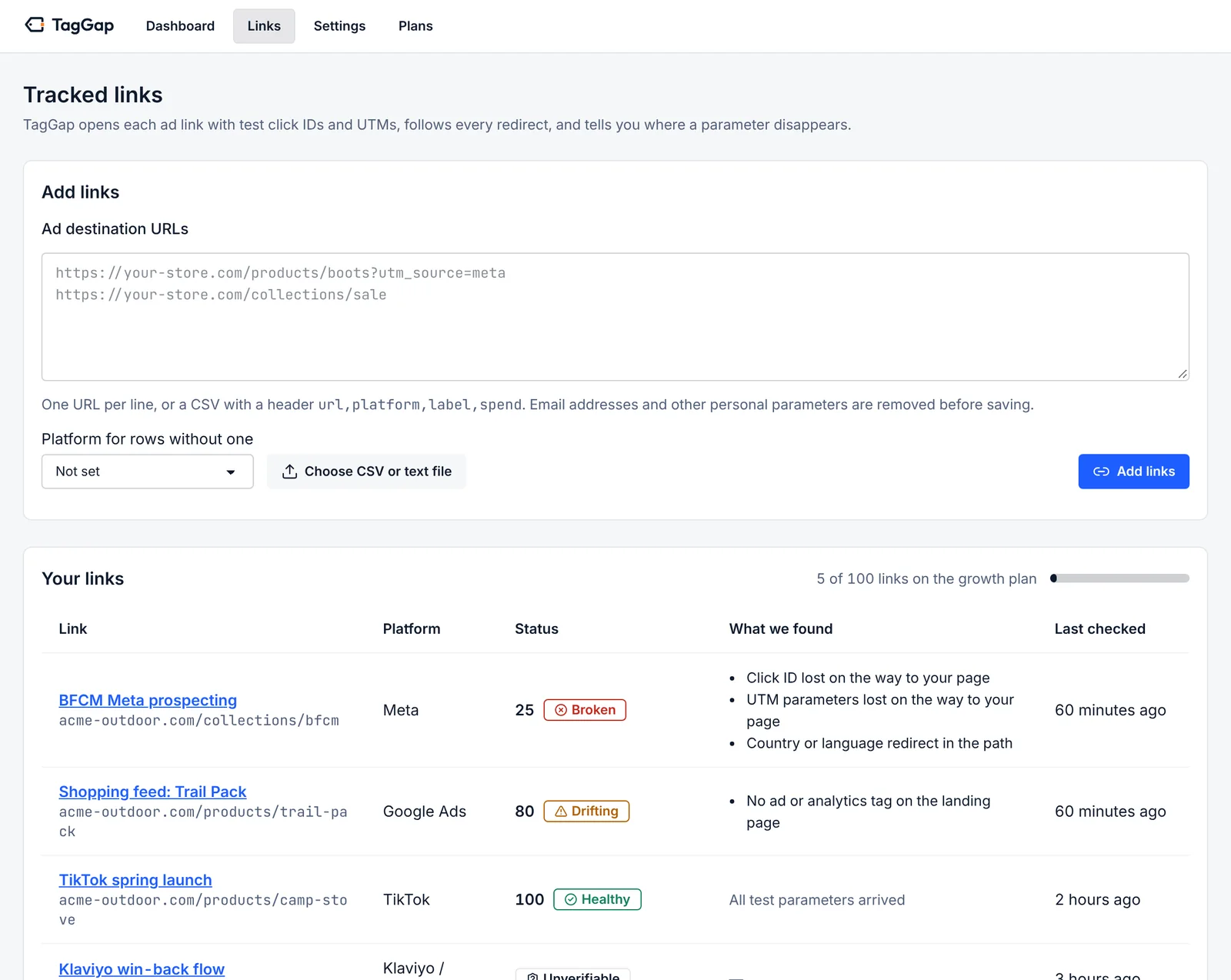
TagGap opens your ad destination URLs with test click ids and UTMs, follows every redirect and tells you where a parameter disappears, before it costs you attribution.
- fbclid, gclid, ttclid and UTMs checked through each hop
- Broken pages, redirect loops and missing tags
- Free single-link check, no install: try it
Audit your tracking instead of guessing
TagGap does not replace your tracking. It checks it, including server-side setups, so you know whether the events you pay to send actually arrive. TagGap vs server-side tracking apps
| What you need | TagGap | Spreadsheet export | Dashboards side by side |
|---|---|---|---|
| Names each Shopify order GA4 never received | Yes | Partly, by hand | No |
| Leaves out POS, test, draft and subscription orders | Yes | Partly, by hand | No |
| Finds duplicate purchases and wrong values | Yes | Partly, by hand | No |
| Explains the likely cause and links a fix | Yes | No | No |
| Re-checks automatically and alerts you | Yes | No | No |
| Changes your tracking setup | No | No | No |
Built to be safe to install
-
Read-only permissions
Shopify read_orders, Google analytics.readonly and Meta ads_read. TagGap cannot edit your store, tags or campaigns.
-
No customer data
No names, emails, phone numbers, addresses or IPs are requested or stored. Order data is deleted after 13 months, or when you uninstall.
-
A real company behind it
Operated by Wells Software Consulting LLC in Chicago, with a published DPA and subprocessor list.
Simple pricing, in public
Start free. Upgrade when you want order-level evidence and faster checks.
Free
$0 / month
Free forever
- No monthly order cap
- 1 destination (GA4 or Meta)
- Weekly check
- 3 monitored ad links
- Weekly tracking report
- Email alerts
Starter
$49 / month
14-day free trial
- Up to 1,000 orders a month
- GA4 + Meta
- Daily check
- 25 monitored ad links
- Everything in Free
- Order-level evidence for every gap
Growth
Most popular$129 / month
14-day free trial
- Up to 10,000 orders a month
- GA4, Meta, Google Ads, TikTok
- Hourly check
- 100 monitored ad links
- Everything in Starter
- Slack alerts
- Root-cause diagnostics
Pro / Agency
$299 / month
14-day free trial
- Up to 50,000 orders a month
- GA4, Meta, Google Ads, TikTok
- Hourly check
- 500 monitored ad links
- Everything in Growth
- Up to 25 stores
- API access
Prices in USD, billed through your Shopify invoice. GA4 and Meta are live today; Google Ads and TikTok comparisons are rolling out on Growth and Pro.
Questions merchants ask
Does TagGap change my tracking or install a pixel?
No. TagGap is read-only. It asks Shopify for read_orders only, Google for analytics.readonly and Meta for ads_read. It never edits your theme, pixels, Customer events, campaigns or ad accounts, so it cannot break anything that works today.
How is this different from a server-side tracking app?
Server-side tracking apps (for example Elevar, Littledata, Stape or TAGGRS) send events to GA4 and Meta. TagGap checks whether those events actually arrived, order by order. Keep the tracking setup you have and use TagGap to prove it works, or to find out exactly where it does not.
How does it work for Meta?
Meta only exposes daily purchase totals to apps, so TagGap compares daily counts and revenue with your Shopify orders. On days with a gap it lists the orders that carried a Meta click or browser id as likely unreported. It labels them probable, not confirmed, because Meta does not reveal which individual purchases it received.
Is some gap between Shopify, GA4 and Meta normal?
Yes. Consent choices, ad blockers, attribution windows and time zones mean the numbers rarely match exactly. The problem is that a normal gap and broken tracking look the same in a dashboard. TagGap separates them: it shows which orders are missing and the likely reason, so you can tell expected loss from a tag that stopped firing.
How much does TagGap cost?
There is a free plan for one destination with a weekly check. Paid plans are Starter at $49, Growth at $129 and Pro / Agency at $299 a month, each with a 14-day free trial. Billing runs through your Shopify invoice.
Find out which orders your tracking missed
TagGap is in Shopify App Store review. Get early access, or run the free scan now.